BotBus Review (2026): Run and Approve Local AI Coding Agents from Your Phone
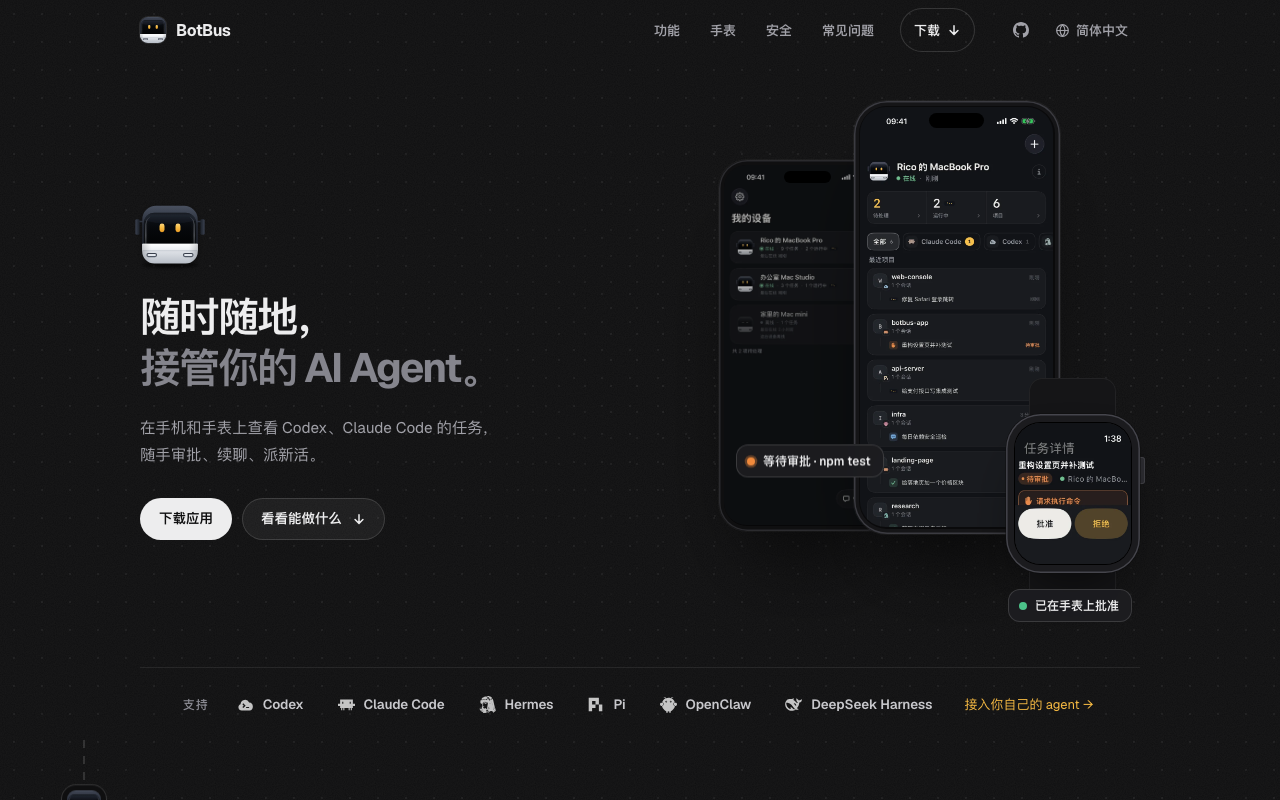
Menu-bar app for Mac/Linux/Windows plus phone and Apple Watch apps to run, approve, and steer local AI coding agents (Codex, Claude Code, and ACP agents) remotely
Category: code · Pricing model: freemium (unverified) · Official site: botbus.io
What BotBus does
BotBus is a companion for the AI coding agents already running on your computer. A resident menu-bar app on Mac, Linux, or Windows auto-discovers local agents (Codex, Claude Code, Hermes, Pi, OpenClaw, DeepSeek Harness, and anything speaking the Agent Client Protocol, such as OpenCode). From your phone (iOS/Android) or Apple Watch you can view task progress across multiple computers, approve or deny actions (run a command, edit a file, answer an agent question), continue or start conversations, dispatch new tasks, interrupt, and even watch and control the computer’s screen (tap, swipe, type — input locked by default). Results — screenshots, files, videos — stream back to your phone, and you can open the agent’s dev-server page on your phone. Content is end-to-end encrypted (AES-256); keys stay on your devices and the server only relays ciphertext.
Who it’s for
Developers who run long AI coding sessions (Codex, Claude Code) on a desktop and step away from it — you keep the session moving from your phone or watch: approvals, follow-ups, new tasks. It is a remote-control layer on top of your existing agents, not an agent of its own.
Key features
- Auto-discovers local agents (Codex, Claude Code, Hermes, Pi, OpenClaw, DeepSeek Harness; ACP agents like OpenCode)
- Multi-computer overview: tasks grouped by agent, project, and device
- Approvals and questions answered in one tap from phone or watch; per-project auto-approve
- Dispatch new tasks with model choice or in a separate git worktree
- Live view and control of the computer screen (tap/swipe/type), input locked by default
- Results to your phone: screenshots, files, videos; open images and PDFs from chat
- Preview the agent’s dev server in your phone’s browser
- End-to-end encryption (AES-256), device-held keys, QR pairing; idle pairs auto-expire after 30 days
- Voice input, send photos from your phone, watch sync, switch model and thinking intensity
- Clients: macOS (Apple Silicon + Intel), Linux (x86_64/aarch64), Windows (in development); iOS + watchOS live, Android in internal testing
How to use BotBus
- Install the desktop client (menu-bar resident; it auto-detects local agents).
- Install the phone app (iOS/Android) and, optionally, the Apple Watch app.
- Pair by scanning the QR code on your computer (keys never touch the server).
- Approve, answer, continue, or dispatch tasks from your phone or watch.
- Watch tasks across all your computers and pull results back to your phone.
Limitations
- No pricing page at check time — the clients are offered for download, but whether features are gated or free could not be verified.
- Controlling the computer screen currently supports Mac only.
- Windows desktop client is still in development; Android is in internal testing.
- Control depends on connector support, task state, and the target computer being online; some tasks are view-only.
- Dev-server preview is proxied through the server and sits outside the end-to-end encryption scope.
- Young product — the agent list and platform support are still expanding.
Pricing
Could not be verified on 2026-10-09: botbus.io lists client downloads (macOS 1.0.7, Linux, iOS, watchOS; Android in internal testing) but publishes no pricing page. The site is in Simplified Chinese and markets to a Chinese developer audience; confirm current availability and any paid tier on the site.
Best for
Developers who run AI coding agents on several machines and want to approve, steer, and monitor them from a phone or watch — with end-to-end-encrypted control.
Alternatives
- Cursor — an AI-first editor where agents run; BotBus is how you reach them remotely.
- Replit — a cloud dev environment with agents; the code runs on their cloud, not your machine.
- GitHub Copilot — in-IDE coding assistance, no remote-control layer.
No comments yet. Be the first to share.